Ability to customize file naming.
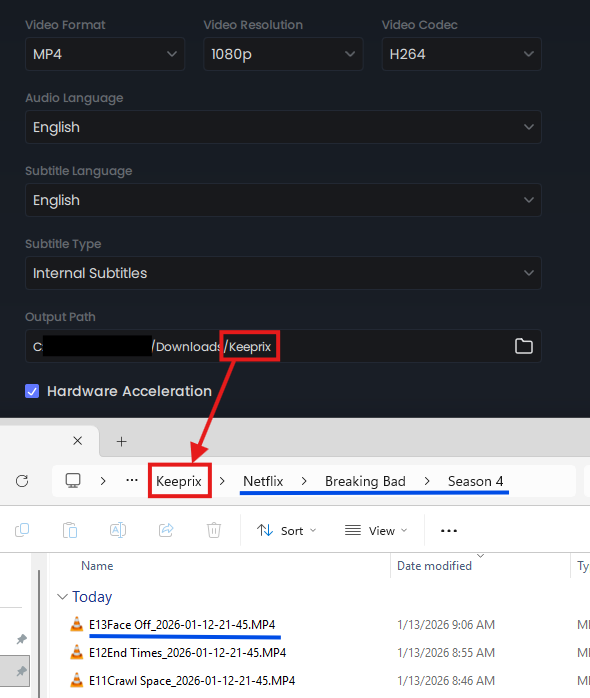
Right now, the only customization is the output path (in red), but everything past that (in blue) is generated by the program and unable to be changed. I actually like the folder structure fine, but I use FileBot to rename files for Plex. But the lack of season number and the date at the end confuses FileBot some times.
Comments3
mmarx82
Mar 17
Use the below powershell script to rename the video files. Save that to a PS1 file (I used
Rename-Videos.ps1). Put your PS1 file in the root of the directory for the videos you want to rename. It will process for that folder and all sub-directories. It will fix Movie file names as well and provide you a summary of what it will change it from and to before you choose to rename the files.
It should be obvious but you want to wait until your season is complete before running. A screenshot is attached showing what you would see when running this file.
*********************************
param(
[string]$Root = (Get-Location).Path,
[switch]$Perform = $true
)
$videoExts = @('.mkv','.mp4','.avi','.mov','.wmv','.m4v')
function Remove-Timestamp {
param($name)
# remove patterns like 2026-03-08-22-45 or 2026-03-08-22-46_4
$name = $name -replace '_\d{4}-\d{2}-\d{2}-\d{2}-\d{2}(_\d+)?',''
$name = $name -replace '\d{4}-\d{2}-\d{2}-\d{2}-\d{2}(_\d+)?',''
return $name
}
function Clean-Title {
param($title)
if (-not $title) { return '' }
$title = Remove-Timestamp $title
# fix possessives
$title = $title -replace '([A-Za-z0-9])_s\b', "$1's"
# remove leftover numeric suffix like _4
$title = $title -replace '_\d+$',''
# convert underscores to spaces
$title = $title -replace '_',' '
# remove double dashes
$title = $title -replace '--+','-'
# collapse whitespace
$title = $title -replace '\s{2,}',' '
return $title.Trim()
}
function Get-SeasonFromFolder {
param($path)
$parent = Split-Path $path -Parent
$folder = Split-Path $path -Leaf
# match "Season 1" or "Season 01"
$m = [regex]::Match($folder,'(?i)Season\s*(\d{1,2})')
if ($m.Success) { return [int]$m.Groups[1].Value }
# match numeric folder like \1\
if ($folder -match '^\d{1,2}$') { return [int]$folder }
return $null
}
$plans = @()
Get-ChildItem -Path $Root -Recurse -File | Where-Object {
$videoExts -contains $_.Extension.ToLower()
} | ForEach-Object {
$file = $_
$ext = $file.Extension.ToLower()
$nameNoExt = [IO.Path]::GetFileNameWithoutExtension($file.Name)
$fullPath = $file.FullName
$directory = $file.DirectoryName
$season = Get-SeasonFromFolder $directory
# detect episode like E01, EP01, etc
$epMatch = [regex]::Match($nameNoExt,'(?i)^E?P?(\d{1,3})')
if ($season -and $epMatch.Success) {
$episode = [int]$epMatch.Groups[1].Value
$titleRaw = $nameNoExt -replace '^(?i)E?P?\d{1,3}',''
$titleRaw = Clean-Title $titleRaw
$newName = ('S{0:D2}E{1:D2} {2}{3}' -f $season,$episode,$titleRaw,$ext)
$dest = Join-Path $directory $newName
if ($dest -ne $fullPath) {
$plans += [pscustomobject]@{From=$fullPath;To=$dest}
}
}
else {
# treat as movie
$parentFolder = Split-Path $directory -Leaf
$title = Clean-Title $parentFolder
# only append year if format is (YYYY) in folder name
$yearMatch = [regex]::Match($parentFolder,'\((19|20)\d{2}\)')
if ($yearMatch.Success) {
$year = $yearMatch.Value
$newName = "$title $year$ext"
}
else {
$newName = "$title$ext"
}
$dest = Join-Path $directory $newName
if ($dest -ne $fullPath) {
$plans += [pscustomobject]@{From=$fullPath;To=$dest}
}
}
}
Write-Host "Planned renames: $($plans.Count)`n"
foreach ($p in $plans) {
Write-Host "From: $($p.From)"
Write-Host " To: $($p.To)"
Write-Host ""
}
if ($Perform) {
Write-Host ""
Write-Host "About to rename $($plans.Count) files." -ForegroundColor Yellow
$confirm = Read-Host "Continue? (Y/N)"
if ($confirm -ne 'Y' -and $confirm -ne 'y') {
Write-Host "Operation cancelled." -ForegroundColor Red
return
}
Write-Host ""
Write-Host "Renaming files..." -ForegroundColor Green
foreach ($p in $plans) {
try {
if (-not (Test-Path $p.To)) {
Rename-Item $p.From -NewName (Split-Path $p.To -Leaf)
Write-Host "RENAMED: $($p.From)"
}
else {
Write-Host "SKIP (exists): $($p.To)" -ForegroundColor DarkYellow
}
}
catch {
Write-Host "ERROR: $($p.From)" -ForegroundColor Red
}
}
Write-Host ""
Write-Host "Done." -ForegroundColor Green
}
Keeprix
Jan 16
Hi,jamarr.
Thank you for sharing your suggestion regarding custom naming templates for downloads. We appreciate your feedback and understand the value this feature would bring.
Our team has noted your request and will consider it for future product improvements. If you have any further ideas or requirements, please let us know.
Your input is important to us as we continue to enhance our service.
An Anonymous User
Jan 15
This would be an OUTSTANDING new feature to help those using Plex.